4. Synchronization
4.2. Unsent Data Warning
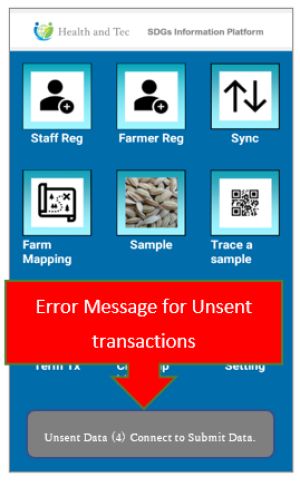
Data synchronization is performed in the background The synchronization is performed automatically at regular intervals. (The interval at which data synchronization takes place is set on the server.)
If the synchronization is failed, an error message “Unsent data” will appear on the menu screen.
The operator does not need to be aware of the synchronization unless an error message appears.
If the terminal does not transmit data for 24 hours, a warning message (Fig. 1) will appear. The terminal will be blocked for 96 hours, and most functions will be unavailable (Fig. 2)
 Normally, data is automatically sent when the application is running.
Android: Sent in the background.
Iphone: Tapping the “Back Button” on the top menu will stop the data transmission. Please do not close the application while data transmission is in progress and wait for the data transmission to be completed.
Caution: Even if there is a signal, you may not be able to connect to the Internet because you have not purchased an “Internet Connection Pack” from a telecommunications company. In this case, please purchase an “Internet Connection Pack” and start the application.