3. Browsing the data
3.4. Dashboard
3.4.2. New Registration
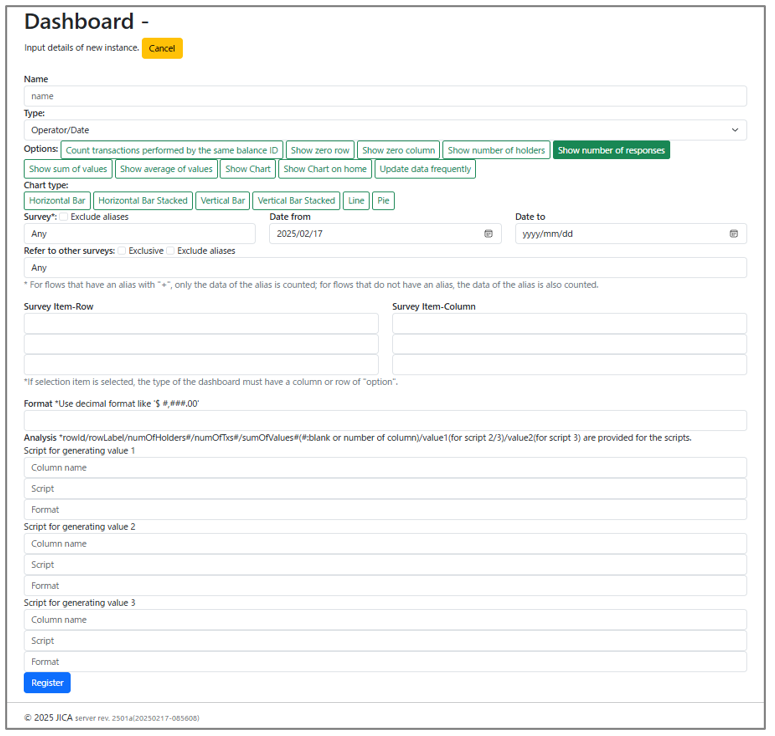
| Item name | Details |
| Name | Name for Dashboard |
| Type | Configure the display on the vertical and horizontal axes of the dashboard. Operator/Date, Operator/Option, Operator/Analysis, Address/Operator, Address/Date, Address/Option, Address/Analysis, Option/Date, Option/Analysis. *Analysis is configured below the same table. It allows additional calculations based on aggregated values to generate further summaries. |
| Options | Option (Please refer to the table of chapter 3.4.2.1.) |
| Chart type | Set the type of graph to display. |
| Survey | Setting of Dashboard Target Survey. Exclude aliases: Do not include aliases (Modify form) in the aggregation. Date from: Start date of the aggregation period. Date to: End date of the aggregation period. |
| Refer to other surveys | Setting of Cross Aggregation Exclusive: Include only surveys with no responses in the aggregation. (Example: Set the training survey for Cross Aggregation and include only people who have not received training in the aggregation.) Exclude aliases: Do not include aliases (Modify form) in the aggregation. |
| Survey item -Row | Configure row display settings for Cross Aggregation (up to 3 items can be specified). |
| Survey item-Column | Configure column display settings for Cross Aggregation (up to 3 items can be specified). |
| Format | Configure display format settings. |
| Analysis | Dashboard Target Survey Settings. |
| Script for generating value 1 | Script to generate values 1,2,3. If you want to add the total value divided by the number of cases, you can write a formula and add it. |