8. Settings of Server Operator
8.3. New registration and edit the information
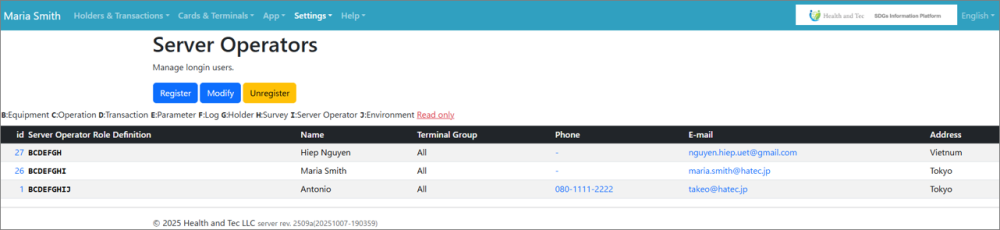 | Step 1: Click the “Register” or” Modify” button on the top page of Server Operators. |
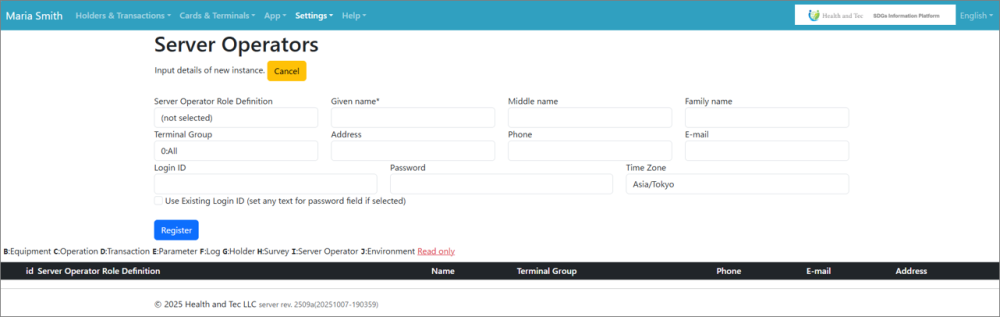 | Step 2: A new registration form will be displayed. Enter the contents and click the “Update” button. Newly registered contents are reflected in the list. |
| Item name | Details |
| Role Read and Write | Select whether to allow read/write roles. • Items and Prices • Items and Prices • equipment • operation • transactions • parameter • Log • holder • survey • server operator |
| Role Read only | Select whether to allow read-only role |
| Terminal Group | Select terminal group |
| Given name | Enter first name |
| Middle name | middle name |
| Family name | Enter family name |
| Birthday | Enter your birthday |
| Address | Enter address |
| Phone | Enter your phone number |
| Enter your email address | |
| Login ID | Enter any login ID |
| Password | Enter any password |
| Time zone | Time zone |
| Login Role | Role of the login • User Administrator • guest |
| Use existing login ID (if selected, set any text in the password field) |