This is an old revision of the document!
5. System settings
5.12. Slip
5.12.3.New registration
 | Step 1:Click the “Register” button on the top page of slips. |
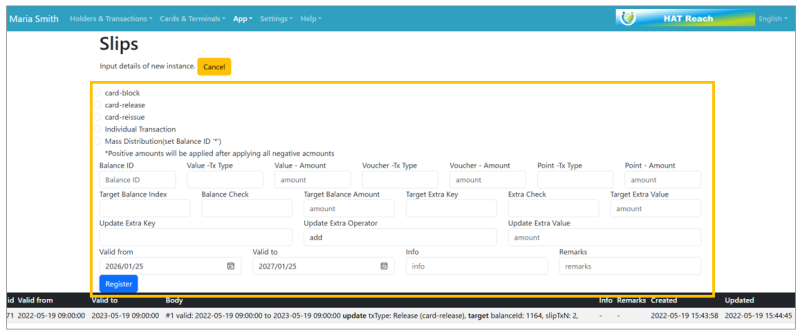 | Step 2:A new registration form will appear at the top of the screen. Fill in the required information and click the “Register” button to register. |
| Item name | Details |
| Card-block | card block |
| Card-release | card release |
| Card-reissue | Reissue of Card |
| Individual Transaction | Individual Transactions (vs. Mass Distribution), To operate by specifying a balance ID, Example: Put 100 yen in Mr. A's balance. |
| Mass Distribution | Used to distribute a certain amount of money to everyone. Example: Distribute 100 yen each to everyone. Note: When specifying the entire balance, enter an asterisk for the balance ID field. |
| Balance ID | Balance ID |
| Hat-Money-Tx Type | Transaction Type |
| Hat-Money-Amount | Amount of money |
| Voucher-Amount | Amount of Voucher |
| Point-Tx Type | Transaction type of points |
| Point-Amount | Number of points |
| Target Balance Index | Target Balance Index |
| Balance Check | Balance Check |
| Target Balance Amount | Target Balance |
| Target Extra Key | Information such as indicating the membership type (some kind of number is specified in the NFC card, which is called Extra Key and has a name) |
| Extra Check | Additional checklist items (eq. (equal), ne. (not equal), ne. (not equal), gt. (greater than), lt. (less than), ge. (greater than or equal to), le. (less than or equal to) EX: Use this item for specific membership ranks, such as granting 100 yen for cards with a specific rank or higher. |
| Target Extra Vakye | target extra key |
| Update Extra Key | Updating Additional Keys |
| Update Extra Operator | Additional operator updates |
| Update Extra Value | Update additional values |
| Valid From | Applicable start date and time |
| Valid To | Applicable (end) date and time |
| Info | information |
| Remarks | remarks |